RAM Hardware Compatibility Checker
Avoid build mistakes before you buy. Check DDR4 vs DDR5 notch fit, IMC speed sweet spots, stick-count load, and air-cooler clearance — then open live kits that match.
DDR4 vs DDR5
Physical notch check
IMC assessment
Speed & gear bounds
Clearance
Height vs dual-tower
Stick load
2-stick vs 4-stick
Find your dedicated platform guide
Select your motherboard and a socket-matched CPU for live kit lists, BIOS notes, and slot loading warnings.
Results update instantly. URL stays shareable.
Motherboard RAM slots
Safe to buy dual-channel DDR5-6000
A 2-stick kit is the sweet spot for stability and dual-channel.
Physical alignment: Perfect
RAM fits the slots. No notch mismatch risk.
IMC controller sweet spot: Active
Memory runs safely in high-bandwidth Gear 1 mode.
Cooler height clearances: Clear
Module clears dual-tower fans comfortably.
[SUCCESS] Physical notch alignment checked: DDR5 correctly matches motherboard slot specs.
[SUCCESS] CPU IMC stability evaluated. Running in optimal Gear 1 (1:1 ratio) at 6000MT/s for maximum bandwidth and lowest latency.
[SUCCESS] Memory clearance confirmed: low-profile heights (33mm) fit under large tower air fins comfortably.
Live 32GB DDR5 kits for this platform
Disclosure: As an Amazon Associate I earn from qualifying purchases. Rankings use price and spec data only — not paid placement. How we rank products
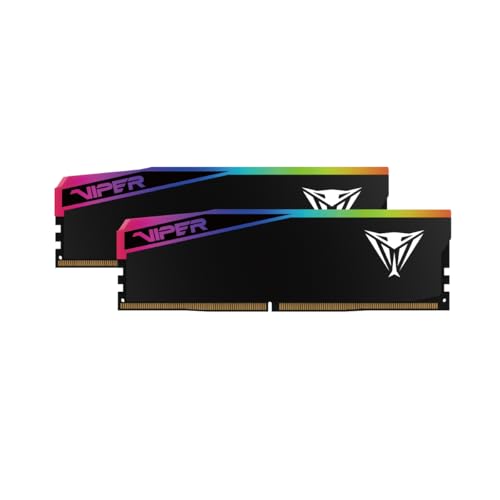
Best match · 32GB
Patriot Viper Elite 5 Ultra RGB DDR5 RAM 32GB (2X16GB) 6000MT/s CL28 Memory
$209.99 · $6.56/GB · 32GB
In stock
Featured Hardware Compatibility Guides
Detailed sweet spot and QVL analysis for popular motherboard and CPU configurations.
Motherboard QVL Memory Matchers
Targeted memory compatibility lists and dynamic RAM matches verified by motherboard.
Looking for a board not listed above? Browse all QVL boards by socket.
Game-Specific RAM Compatibility & Tuning Guides
Resolve memory leaks, out-of-memory crash codes (Exit Code 137), and micro-stutters for modern PC, laptop, and handheld titles.
Handheld & Mini-PC Memory Upgrade Guides
Physical SO-DIMM clearances, unified LPDDR5X configurations, Apple Silicon memory pressure diagnostics, and BIOS UMA tweaks.
Minecraft Client & Modpack Memory Allocation Hub
Optimize allocations dynamically. Generate optimized G1GC/ZGC JVM startup arguments to resolve client freeze stutters.
Understanding Internal Memory Controllers (IMC)
The **Internal Memory Controller (IMC)** resides inside your physical CPU chip, not on your motherboard. The IMC determines the ultimate stable speed bounds of your memory. While motherboard manufacturers often advertise speeds like DDR5-8000+ on their PCB specifications, the ability to achieve those speeds is almost entirely dependent on the strength of your specific CPU's IMC (referred to as the "Silicon Lottery").
On AMD Zen 4/5 platforms, the FCLK (Infinity Fabric) is highly optimized at 2000MHz. Running memory at DDR5-6000 allows the memory controller to run in a 1:1 ratio (Gear 1), ensuring the lowest possible latency. Pushing speeds higher forces Gear 2, which induces a latency penalty that often negates the higher raw clock speed bandwidth.
Check Pricing Catalogs & Tools
Compatibility Scanner FAQ
How do I know if my motherboard supports DDR4 or DDR5?
DDR4 and DDR5 slots are keyed differently (the physical notch is in a different position), making them physically incompatible. You cannot install DDR5 memory in a DDR4 slot, or vice versa. AMD AM5 motherboards only support DDR5. Intel LGA1700 motherboards exist in separate DDR4 and DDR5 versions, so you must select the specific board SKU. Intel LGA1851 motherboards only support DDR5.
What is the maximum stable RAM speed for AMD AM5 (Ryzen 7000/9000)?
The memory controller (IMC) sweet spot for AMD AM5 processors is DDR5-6000. While AM5 can boot higher speeds, exceeding 6000MT/s usually forces the memory controller into a 2:1 ratio (Gear 2), which doubles latency and reduces real-world performance. 6000MT/s CL30 offers the absolute best balance of speed, stability, and latency for Ryzen 7000/9000.
Why does running 4 sticks of DDR5 slow down my RAM speed?
Running 4 modules (quad-stick configuration) places a massive load on the CPU's internal memory controller (IMC). In addition, most modern motherboards are daisy-chained, meaning slots 1 and 3 suffer from electrical signal reflection. On DDR5 platforms, running 4 sticks will force the system to downclock severely (often down to JEDEC 4800MT/s or 5200MT/s) to maintain stability. For gaming, always buy a high-density 2-stick kit instead of 4 sticks.
Does CPU cooler height clearance matter for RAM?
Yes. Premium high-performance RAM kits often feature tall aluminum heatspreaders or dynamic RGB lightbars exceeding 40mm in height. If you are using a large dual-tower air cooler (like the Noctua NH-D15 or Thermalright Peerless Assassin), the cooler fan will hang over the RAM slots. Low-profile RAM (under 35mm height) is required to clear these fans, otherwise you must slide the fan upwards, which increases total height clearance requirements inside your PC case.