RAM QVL & compatible kits for ASUS Sabertooth 990FX R3.0
DDR3-1600 or DDR3-1866 CL9 represents the legacy platform standard, offering excellent stability at 1.5V. Shop live sweet-spot kits below, then confirm slot placement and run a part-number scan if you already have a model in mind.
Chipset
990FX (AM3+)
Slot type
DDR3 UDIMM
Max rated clock
2000 MT/s
Physical slots
4 DIMM
Max capacity
32 GB
Live sweet-spot kits
Disclosure: As an Amazon Associate I earn from qualifying purchases. Rankings use price and spec data only — not paid placement. How we rank products

Best match
【DDR3 RAM 32GB】 32GB (4X8GB) PC3-12800U DDR3-1600 UDIMM 2Rx8 DIMM RAM DDR3 8GB 1600MHz SDRAM 240-Pin 1.5V CL11 Non-ECC Desktop PC Memory Kit
$69.88 · $2.18/GB
In stock

DDR3 kit
32GB DDR3 RAM 4X8GB PC3-12800U DDR3-1600 UDIMM 2Rx8 DIMM RAM DDR3 8GB 1600MHz SDRAM 240-Pin 1.5V CL11 Non-ECC Desktop PC Memory Kit
$69.88 · $2.18/GB
In stock

QVL match
16GB (2X8GB) PC3-12800U DDR3-1600 UDIMM 2Rx8 DIMM RAM DDR3 8GB 1600MHz SDRAM 240-Pin 1.5V CL11 Non-ECC Desktop PC Memory Kit DIMM
$37.99 · $2.37/GB
In stock
Verified on this board's QVL shortlist
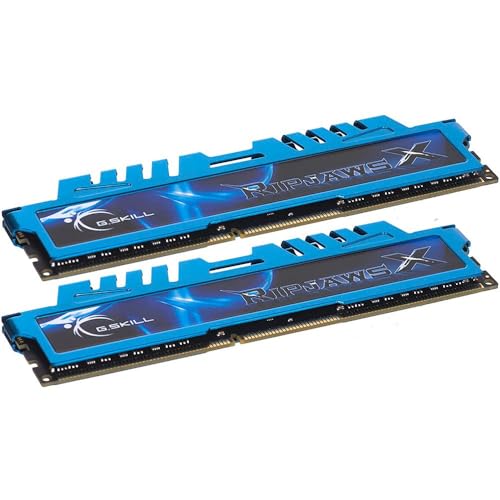
QVL match
G.SKILL RipjawsX Series DDR3 RAM (XMP) 16GB (2x8GB) Up to 1600MT/s* CL9-9-9 1.50V Desktop Computer Memory U-DIMM (F3-1600C9D-16GXM)
$99.99 · $6.25/GB
In stock
QVL match
16GB (2X8GB) PC3-12800U DDR3-1600 UDIMM 2Rx8 DIMM RAM DDR3 8GB 1600MHz SDRAM 240-Pin 1.5V CL11 Non-ECC Desktop PC Memory Kit DIMM
$37.99 · $2.37/GB
In stock
RAM slot placement
On 4-slot daisy-chain boards, populate A2 and B2 first (slots 2 & 4 from the CPU).
DDR3 load & speed notes
The ASUS Sabertooth 990FX R3.0 is optimized for a 2-module kit at the platform sweet spot. That preserves signal integrity and XMP/EXPO boot rates.
Need capacity? Buy a denser dual kit rather than mixing sticks. Update BIOS before training a new EXPO/XMP profile.
Browse matched catalog kits
Sweet-spot, QVL shortlist, and capacity buckets from today's catalog.
QVL part-number scanner
Paste an MPN or ASIN (e.g. CMK32GX5M2B6000C30) to check generation fit and speed risk.
Scanner idle
Paste a RAM part number to check notch generation and speed fit.
Disclosure: As an Amazon Associate I earn from qualifying purchases. Rankings use price and spec data only — not paid placement. How we rank products
Sweet-spot recommendations
DDR3-1600 or DDR3-1866 CL9 represents the legacy platform standard, offering excellent stability at 1.5V. These kits keep the IMC efficient.
| Product | Specs | Score | Price | $/GB | Action |
|---|---|---|---|---|---|
【DDR3 RAM 32GB】 32GB (4X8GB) PC3-12800U DDR3-1600 UDIMM 2Rx8 DIMM RAM DDR3 8GB 1600MHz SDRAM 240-Pin 1.5V CL11 Non-ECC Desktop PC Memory Kit motoeagle · B0DDH584W9 | 32GB (4x8) 1600MHz CAS: CL11 / DDR3 | 98/100 | $69.88 In stock | $2.18/GB | |
32GB DDR3 RAM 4X8GB PC3-12800U DDR3-1600 UDIMM 2Rx8 DIMM RAM DDR3 8GB 1600MHz SDRAM 240-Pin 1.5V CL11 Non-ECC Desktop PC Memory Kit motoeagle · B0GCFKKWCK | 32GB (4x8) 1600MHz CAS: CL11 / DDR3 | 96/100 | $69.88 In stock | $2.18/GB | |
16GB (2X8GB) PC3-12800U DDR3-1600 UDIMM 2Rx8 DIMM RAM DDR3 8GB 1600MHz SDRAM 240-Pin 1.5V CL11 Non-ECC Desktop PC Memory Kit DIMM motoeagle · B0CPLSHJMM | 16GB (2x8) 1600MHz CAS: CL11 / DDR3 | 98/100 | $37.99 In stock | $2.37/GB | |
 Timetec 16GB KIT(2x8GB) DDR3 1600MHz (DDR3-1600) PC3-12800 (PC3-12800U) Non-ECC Unbuffered 1.5V CL11 2Rx8 Dual Rank 240 Pin UDIMM Desktop PC Computer Memory RAM(SDRAM) Module Upgrade Timetec · B0CVQZPC3M | 16GB (2x8) 1600MHz CAS: CL11 / DDR3 | 94/100 | $37.99 In stock | $2.37/GB | |
![[DDR3 8GB] 8GB 2RX8 PC3-12800U 11-12 RAM, 8 GB DDR3 1600 240 PIN Desktop Memory, DDR3 1600MHZ UDIMM SDRAM 1.5V CL11 Non-ECC PC](https://m.media-amazon.com/images/I/51X44IQ6qnL._AC_SL500_.jpg) [DDR3 8GB] 8GB 2RX8 PC3-12800U 11-12 RAM, 8 GB DDR3 1600 240 PIN Desktop Memory, DDR3 1600MHZ UDIMM SDRAM 1.5V CL11 Non-ECC PC Unknown · B0CPLS3S8M | 8GB 1600MHz CAS: CL11 / DDR3 | 98/100 | $19.99 Check Amazon | $2.50/GB | |
 Rasalas 8GB DDR3 Kit (2X 4GB) PC3-12800 1600 Ram for Desktop - 2Rx8 Udimm 1.5V CL11 Memory Rasalas · B07QRQ7947 | 8GB (2x4) 1600MHz CAS: CL11 / DDR3 | 93/100 | $19.99 In stock | $2.50/GB |
Other AM3+ QVL matchers
Understanding motherboard QVL lists
A QVL (Qualified Vendor List) is a manufacturer-tested shortlist of memory kits. It is a strong compatibility signal — not an exclusive allowlist.
Kits missing from the QVL can still work when they match the board's generation (DDR3 UDIMM) and stay near the CPU IMC sweet spot. Prefer dual-channel kits and a current BIOS when enabling XMP/EXPO.
Which RAM slots should I use on my ASUS Sabertooth 990FX R3.0?
For optimal dual-channel signal integrity on the ASUS Sabertooth 990FX R3.0, install a 2-stick kit in slots 2 and 4 (usually A2 and B2). That terminates daisy-chain traces cleanly and avoids reflection issues from loading A1/B1 first.
What is the maximum supported memory speed for the Sabertooth 990FX R3.0?
The ASUS Sabertooth 990FX R3.0 officially supports up to 2000MT/s via BIOS XMP or EXPO. Real-world stable frequency still depends on your CPU's IMC. Prefer the platform sweet spot over the absolute max for daily boots.
Can I run 4 sticks of DDR3 RAM on this motherboard at full speed?
Four modules stress the memory controller hard. On AM3+ DDR3, fully populated boards often drop toward JEDEC speeds. Prefer a high-density 2-stick kit for XMP/EXPO stability.